CyberDefenders: Oski Lab Writeup
Scenario
The accountant at the company received an email titled "Urgent New Order" from a client late in the afternoon. When he attempted to access the attached invoice, he discovered it contained false order information. Subsequently, the SIEM solution generated an alert regarding downloading a potentially malicious file. Upon initial investigation, it was found that the PPT file might be responsible for this download. Could you please conduct a detailed examination of this file?
We are provided with a zip file containing a password protected txt file
Password: cyberdefenders.org
Upon opening the txt file, we are given an MD5 hash of the supposed malicious file. The first thing we can do is put this file hash through virustotal and see what information we can get out of this.
Website: https://www.virustotal.com/gui/home/search
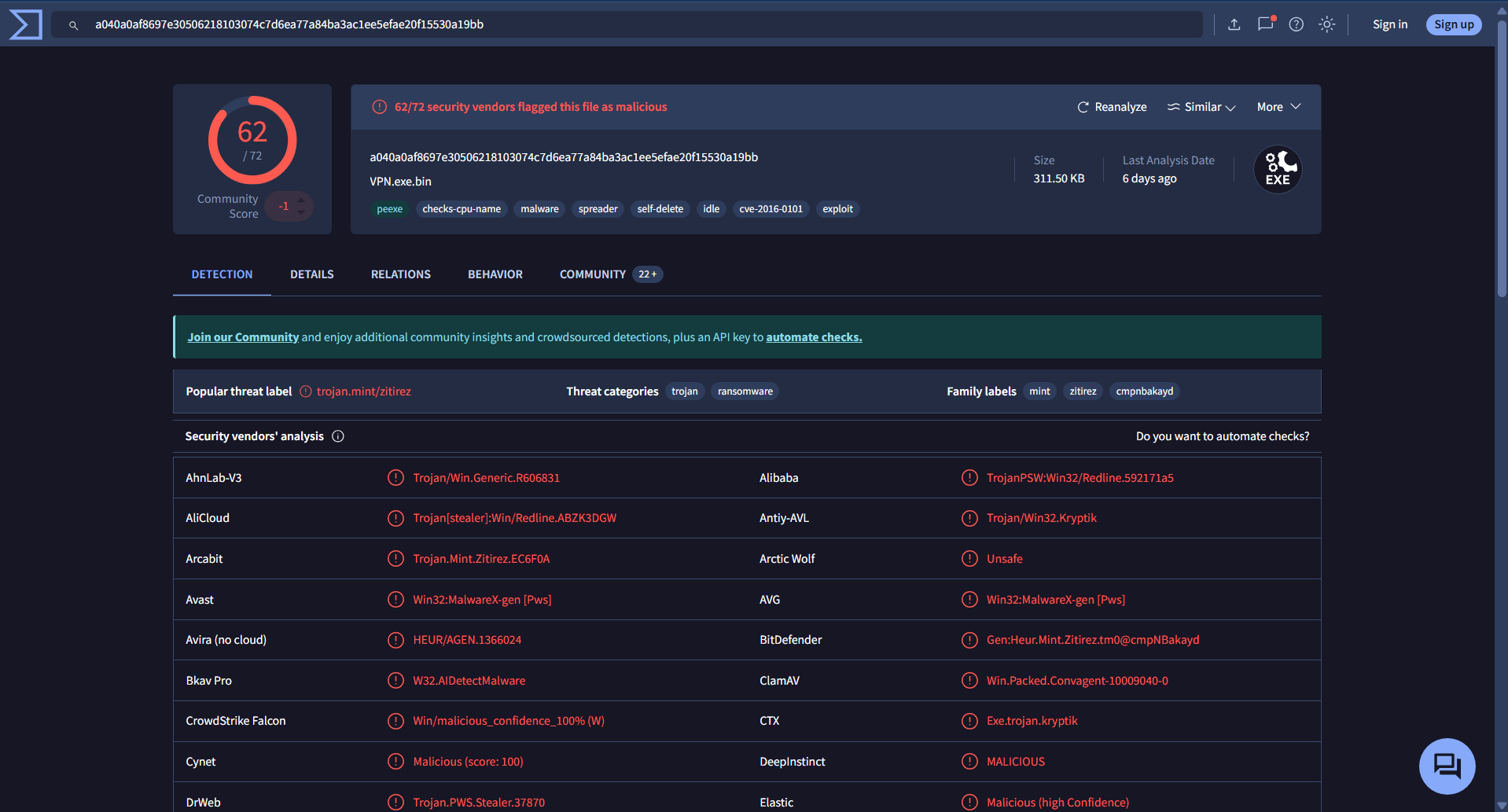
The malicious file here is VPN.exe.bin which is confirmed by 62/72 security vendors. Navigating to the details tab, we can see more information regarding this file.
Q1. Determining the creation time of the malware can provide insights into its origin. What was the time of malware creation? (Format: YYYY-MM-DD HH:MM)
A. 2022-09-28 17:40
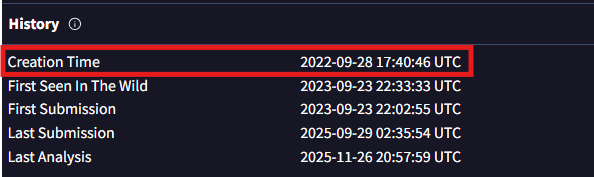
In the Historysection, we can see various information such as when the file was created, when it was first encountered in the web, and when it was submitted to VirusTotal. This helps create a timeline and asses the risk.
Q2. Identifying the command and control (C2) server that the malware communicates with can help trace back to the attacker. Which C2 server does the malware in the PPT file communicate with?
A. http://171.22.28.221/5c06c05b7b34e8e6.php
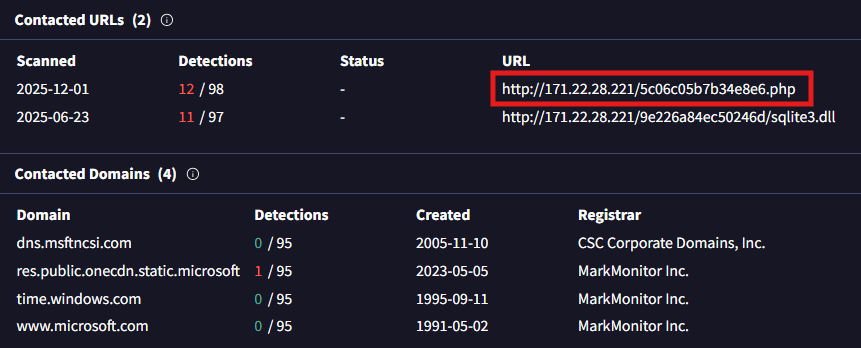
This is the command and control (C2) server since the .php file is used as a “listener” to send data to. The PHP file represents the active communication channel aka the C2. In contrast, the DLL URL represents a payload download. This file most likely contacted this server to download a tool to use on the victim’s machine.
Q3. Identifying the initial actions of the malware post-infection can provide insights into its primary objectives. What is the first library that the malware requests post-infection?
A. sqlite3.dll
Going back to the previous screenshot, when the malware infects the victim, it requires external dependencies in order to execute. The malware downloads this DLL file to possibly parse user data which is most likely in the SQLite format.
Q4. By examining the provided Any.run report, what RC4 key is used by the malware to decrypt its base64-encoded string?
A. 5329514621441247975720749009
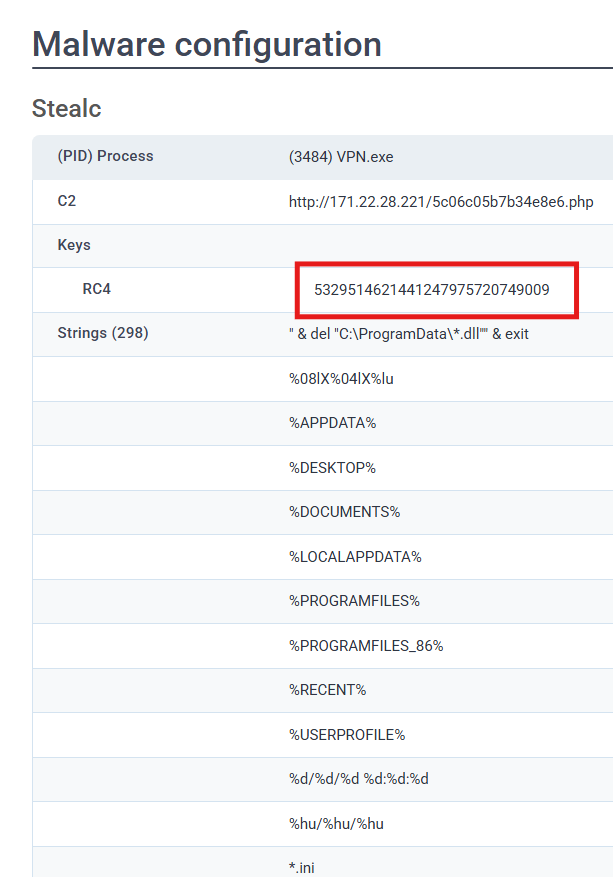
Stealc is an information stealer that can heavily obfuscate code in order to hide it from detection. It stores important data as Base64 encoded strings and further encrypted using RC4. The answer here is the “master key” to unlock and decode the strings.
Q5. By examining the MITRE ATT&CK techniques displayed in the Any.run sandbox report, identify the main MITRE technique (not sub-techniques) the malware uses to steal the user’s password.
A. T1555
We can view the full analysis here: https://app.any.run/tasks/d55e2294-5377-4a45-b393-f5a8b20f7d44
In the top right, we can see the ATT&CK button. When you click it, you are redirected to the MITRE ATT&CK Matrix of the malware. We are looking for the technique used to steal the user’s password. In the Credential Access section, the only one that stands out is the Credentials from Password Stores When you click on it, we are provided with unique technique number.
Q6. By examining the child processes displayed in the Any.run sandbox report, which directory does the malware target for the deletion of all DLL files?
A. C:\ProgramData
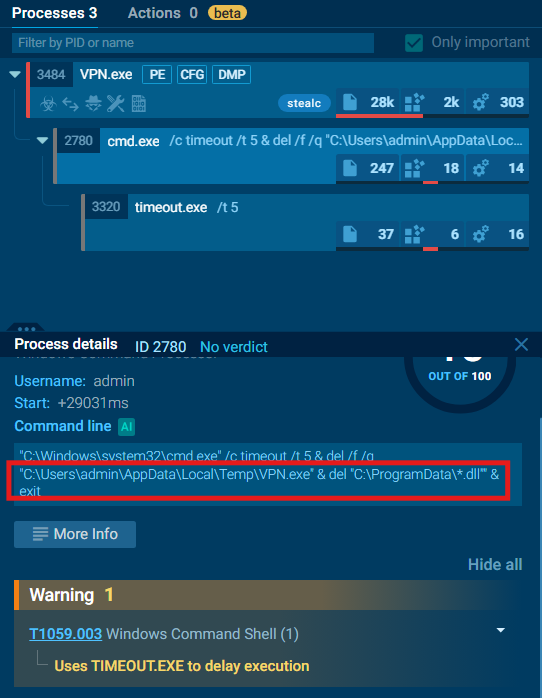
Looking at the processes section, we are able to see the execution flow of the programs running on the computer. The program starts with VPN.exe which opened cmd.exe to perform a specific task. This tree is useful as it shows the entire timeline of the attack: Infection (VPN.exe) → Cleanup (cmd.exe) → Deletion (timeout.exe). In cmd.exe, the malware covers its tracks by removing the initial installer and the dependencies it needed.
Q7. Understanding the malware's behavior post-data exfiltration can give insights into its evasion techniques. By analyzing the child processes, after successfully exfiltrating the user's data, how many seconds does it take for the malware to self-delete?
A. 5
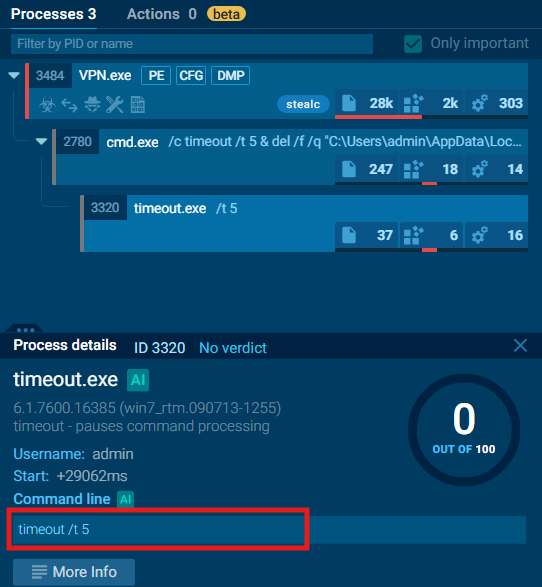
The command, timeout /t 5 calls the timeout utility from Windows and specifies a wait time of 5 seconds. This allows enough time for the parent process, VPN.exe, to terminate ensuring that the command in cmd.exe to successfully remove the malware.